I realize that wading through all of the bullsh*t advertisements on the internet can make downloading complicated and frustrating. Thus, I’ve put together a little tutorial that will hopefully rectify a large percentage of the issues relating to the myriad of potentially clickable buttons. See below for the only three clicks you should have to make to start the downloading process.
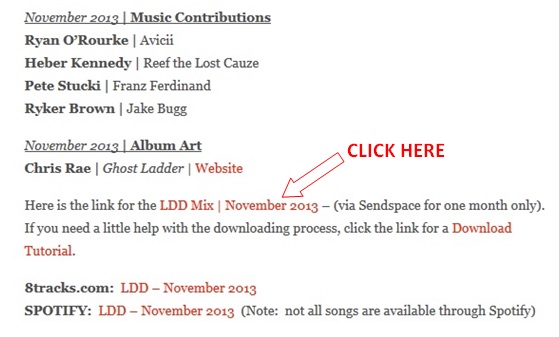
Step 1 | Click the Music Mix link in my blog post (see below for sample)
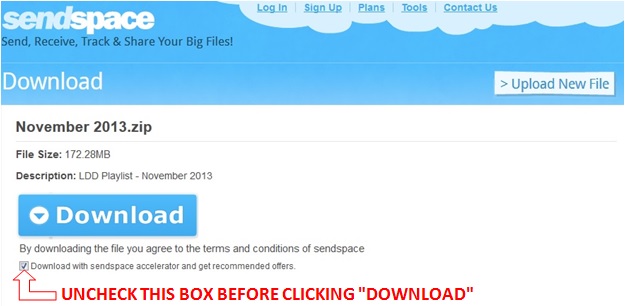
Step 2 | Uncheck the box at the bottom before clicking the “Download” button.
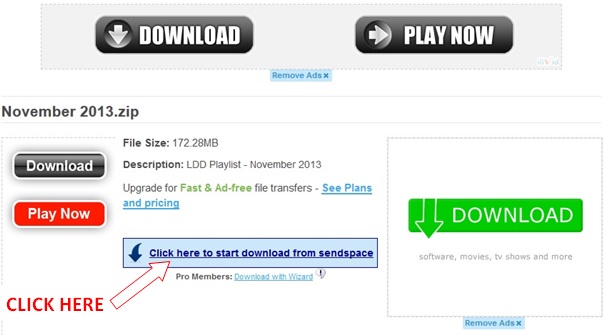
Step 3 | Avoid anything that says “Play Now” or “Download”. These are ads! The link to the zip file is very discrete but should read “Click here to start download from sendspace”.
Step 4 | Leave the “Save As” button checked and click “OK”.
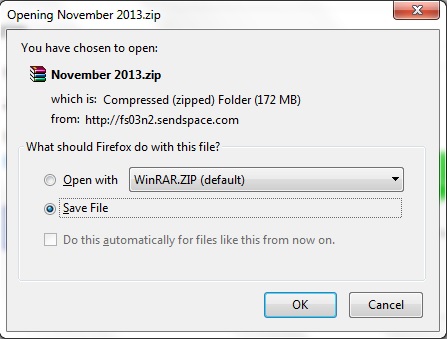
These additional steps should get you the rest of the way…
Step 5 | Wait for the download to complete and then locate the zip file on your computer, unzip and place the individual files into the folder that contains the rest of your music files.
Step 6 | Load files into iTunes (or other media player) and enjoy!
Hopefully this helps and your experience is, as one user put it, “easy peazy, lemon squeazy.” If you have any problems with the process or encounter screens other than the ones shown above, please let me know and I’ll do my best to help.


